What it’s for
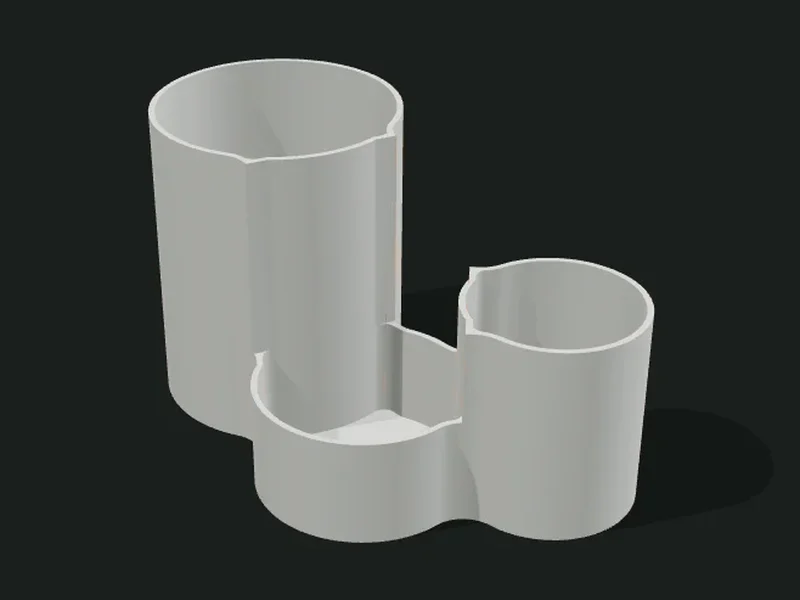
An organic-shaped container made of circles (lobes) that merge with a soft waist, like a peanut, a clover or a cloud. Each lobe can be a compartment with its own height, giving a very decorative stepped profile, or all of them together can form a single cavity.
Ideas
- Stepped desk pencil holder (tall pencils, clips in the low lobe).
- Clover-shaped jewelry or ring tray.
- Multiple planter for small succulents.
- Decorative catch-all for the entrance.
Step by step
- Choose a preset: «Stepped trio», «Peanut with rings», «Clover», «Cascade of 4» or «Freehand».
- In «Silhouette» choose the arrangement and how many lobes. With «Freehand» you move them yourself in the top view.
- Adjust the base radius, the size variation and the spacing to decide how much they merge.
- In «Heights and compartments» choose whether each lobe is a compartment or everything is one cavity, and the height profile.
- Smooth the waist until the joins look rounded and export.
Tips
- If the spacing is very small, the lobes overlap so much the shape is lost; with 0.7–0.8 you get the typical waist.
- A very smoothed waist with small lobes can close the passage between compartments: lower the smoothing.
- Low lobes (under 25 mm) work for clips or rings; for pencils use 90 mm or more.
- In «Freehand» mode, drag each circle in the top view; radius and height are edited in the list.
Presets
Parameters
Silhouette
How many lobes, how they’re arranged and how much they merge (shape seen from above).
How the lobes are arranged: in a line, zigzag, arc, triangle (three), cluster or «Freehand», where you move them yourself in a top view with the mouse.
List of lobes for «Freehand» mode. Each one has an X and Y position (center), radius and height. You can add up to 8 and drag them in the top view.
Number of lobes (circles) forming the silhouette. 1 gives a round cup; 2 a peanut; 3 or more, a clover or cloud.
Radius of the reference lobe. The others can be bigger or smaller depending on the size variation.
How the lobes’ size changes: all equal, alternating big and small, decreasing from one end to the other, or with the center one bigger.
How much the sizes change following the chosen pattern. 0 is no change; 0.2 is about a 20 % difference; 0.5 is very pronounced.
Distance between centers, as a fraction of the sum of the radii. 1 leaves the circles barely touching; 0.7 merges them quite a bit; under 0.6 overlaps them a lot.
Rounding of the «waist» where two lobes meet. 0 leaves a sharp angle; 10–15 mm gives the soft, organic shape.
Heights and compartments
Whether each lobe is a separate compartment, the height of each one and the thicknesses.
«One per lobe» leaves a divider between lobes and each one has its own height. «Single cavity» makes one inner space with the whole silhouette, all at the same height.
Height profile of the compartments: «Stepped» goes down from one end to the other; «Uniform» all equal; «Alternating» high-low-high; «Central peak» the middle one tallest; «Custom» one value per lobe.
Height of the tallest lobe (or of the whole container if it’s a single cavity or uniform profile).
Height of the lowest lobe in the stepped, alternating and central peak profiles.
Height of each lobe, one by one, when the profile is «Custom». The first value is for the first lobe (the leftmost).
Thickness of the outer walls and of the dividers between lobes. 1.6–2 mm is sturdy.
Thickness of the floor. 1.6–2 mm is enough; raise it if you’ll use it as a planter with weight.
Rounding of the inner corners where the wall meets the divider. It makes it easier to get small things out of the bottom.
Outer texture
Decorative relief on the outer walls. It doesn’t change the inside sizes.
Relief on the outer walls. The texture is added outward: the inside and the wall thickness don’t change, so inserts and usable sizes stay the same. «Ribs» and «Flutes» are vertical, «Rings» horizontal, «Waves» helical and «Knurl» a diamond pattern that gives grip.
How far the texture sticks out (mm). 0.6–1 mm shows well without overdoing it; more than 2 mm adds a lot of material and print time.
Spacing between ribs, flutes or waves measured around the part. Small values give fine striping; large ones, bold. It should be at least 3 times the relief.
Vertical spacing between rings, waves or knurl diamonds. With 0.2 mm layers, less than 2 mm looks stepped.