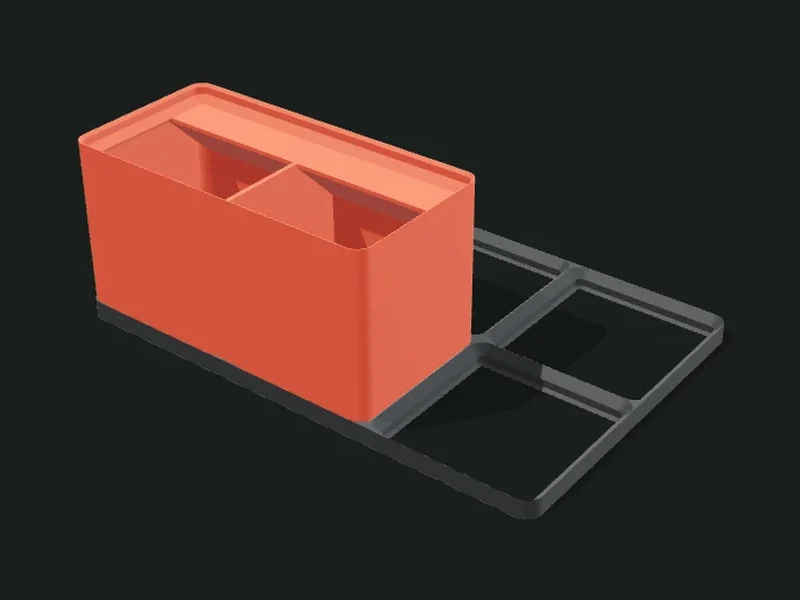
What it’s for
Modules compatible with Gridfinity, the open modular organization system based on a 42 × 42 mm grid and heights in multiples of 7 mm. Each module (bin) has a stepped foot that fits into a base (baseplate), and a lip on top to stack another one on it. Since it’s a standard, what you make here fits bins and baseplates from other designers.
Ideas
- Organize workshop drawers: screws, drill bits, bits and small tools.
- Modular desk where each bin lifts out and can be rearranged.
- Electronics drawers with components separated by value.
- Workbench base where all kinds of bins fit.
Step by step
- Choose a preset: bins with scoop, small bin for screws, low tray or just the baseplate.
- In «Module» choose how many units wide and deep it is (each one is 42 mm) and the height (each unit is 7 mm).
- In «Compartments» divide the bin into columns and rows, and turn on the scoop or the label tab if you want them.
- In «Baseplate» choose the size of the plate the bins fit into (measure your drawer and divide by 42).
- Export: the bin and the baseplate come out as different parts.
Tips
- To know how many units fit in a drawer, divide its inner size by 42 and round down.
- Standard magnets are 6 × 2 mm: they’re glued into the bin’s foot and into the baseplate (if it has magnets).
- The open baseplate (bottom 0) is the standard one and uses little filament; with a closed bottom it’s stiffer.
- The front scoop makes it very easy to get screws and small parts out by sliding them with your finger.
Presets
Parameters
Module
The bin: size in grid units, height, stacking lip and magnets.
Includes the module (bin). Turn it off if you only want to print the baseplate.
Width of the bin in 42 mm units. 1 = 42 mm, 2 = 84 mm, and so on (minus the standard half millimeter of play).
Depth of the bin in 42 mm units, from front to back.
Height of the bin in 7 mm units (not counting the lip). 3 u = low, for screws; 6 u = medium; 10 u or more = tall.
Adds the standard stacking lip on the top rim: another bin can fit on top. If you won’t stack, remove it and gain room to grab things.
Thickness of the bin’s walls. The standard is 1.2 mm; thicker takes away inner space.
Thickness of the floor above the stepped foot. 1.2 mm is enough; raise it if you carry magnets or heavy parts.
Adds the four pockets for 6 × 2 mm magnets in each unit’s foot, compatible with magnetic baseplates.
Compartments
Inner divisions of the bin, front scoop and label tab.
Compartment columns of the bin (left to right) and their relative width. Drag the boundaries on the bar.
Compartment rows (front to back) and their relative depth.
Thickness of the inner dividers. 1.2 mm is sturdy for small bins.
How much lower than the rim the dividers are. 0 leaves them flush; lower makes it easier to grab things.
Radius of the curve added on the inner front of each compartment (like a scoop). That way small parts slide out. 0 removes it.
Adds a slanted tab at the top, behind each column, to stick on or write a label.
Depth of the label tab. 12 mm is the usual size for printed labels.
Baseplate
The gridded plate the bins fit into.
Includes the gridded baseplate the bins fit into.
Width of the baseplate in 42 mm units. Measure the drawer and divide by 42.
Depth of the baseplate in 42 mm units.
Thickness of a solid bottom under the baseplate. 0 makes the standard open frame (uses less filament); with 1–2 mm the baseplate is stiffer and doesn’t warp.