What it’s for
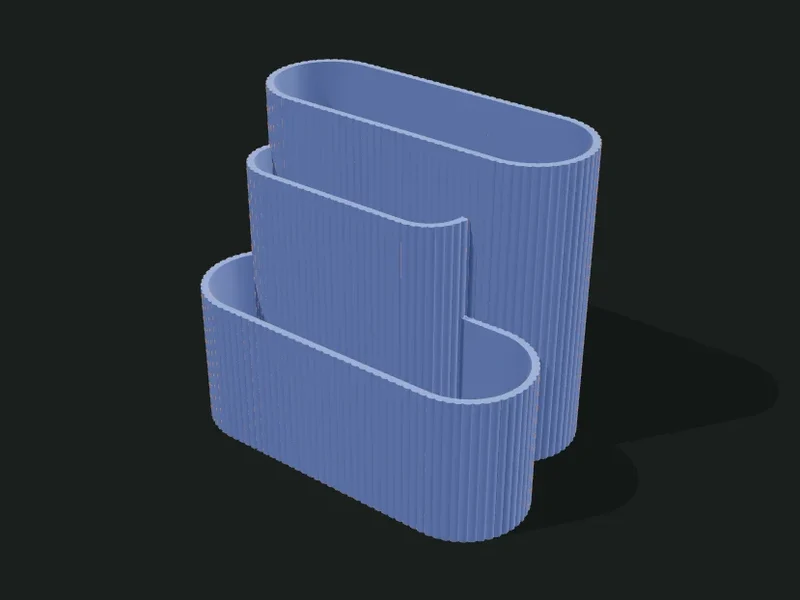
An organizer made of several capsule-shaped cups (rectangles with rounded ends) that cross and merge with each other. Each capsule has its own length, width, height and rotation, so compartments of different heights form: tall ones for pencils, low ones for clips, long ones for rulers or scissors.
Ideas
- Sculptural desk organizer for pencils, scissors and small notebooks.
- Holder for cutlery or kitchen utensils.
- Holder for brushes and craft tools.
- Decorative centerpiece with dried plants.
Step by step
- Choose a preset: «Interlaced S», «Staircase of 4», «Cross» or «Fan».
- In the «Capsules» list adjust each one: position, length, width, height and rotation.
- Add new capsules or duplicate an existing one and move it to cross the others.
- Use «Overall scale» to enlarge or shrink the whole set without touching each capsule.
- Add an outer texture and export.
Tips
- Where two capsules cross, the taller one wins: the lower one becomes a stepped compartment.
- To keep the set from tipping over, put the tall capsules near the center and the low ones toward the outside.
- A capsule under 25 mm wide works for loose pencils; for scissors use 35 mm or more.
- With rotation you can build fans and crosses: 90° sets it perpendicular to the others.
Presets
Parameters
Capsules
Each capsule is a cup with its own shape, position, height and rotation. Those that cross merge into a single part.
List of capsules. For each one: X and Y position of the center, length, width (the diameter of the rounded ends), height and rotation in degrees (0° lays it along the X axis). Add, remove or duplicate capsules with the list buttons.
How the capsules combine where they cross: interlaced (each wall goes through its neighbor, leaving many compartments), fused (a single container: the inner walls are removed and the tallest forms steps) or cut in order (the first in the list stays whole in front and the following ones are cut where they touch it).
Enlarges or shrinks the whole organizer evenly (1 = original size, 1.2 = 20 % bigger). It doesn’t change the wall or floor thickness.
Thickness of the capsules’ walls. 1.6–2 mm is sturdy.
Thickness of the floor. 1.6–2 mm is enough; thicker gives it weight and stability.
Outer texture
Decorative relief on the outer walls. It doesn’t change the inside sizes.
Relief on the outer walls. The texture is added outward: the inside and the wall thickness don’t change, so inserts and usable sizes stay the same. «Ribs» and «Flutes» are vertical, «Rings» horizontal, «Waves» helical and «Knurl» a diamond pattern that gives grip.
How far the texture sticks out (mm). 0.6–1 mm shows well without overdoing it; more than 2 mm adds a lot of material and print time.
Spacing between ribs, flutes or waves measured around the part. Small values give fine striping; large ones, bold. It should be at least 3 times the relief.
Vertical spacing between rings, waves or knurl diamonds. With 0.2 mm layers, less than 2 mm looks stepped.