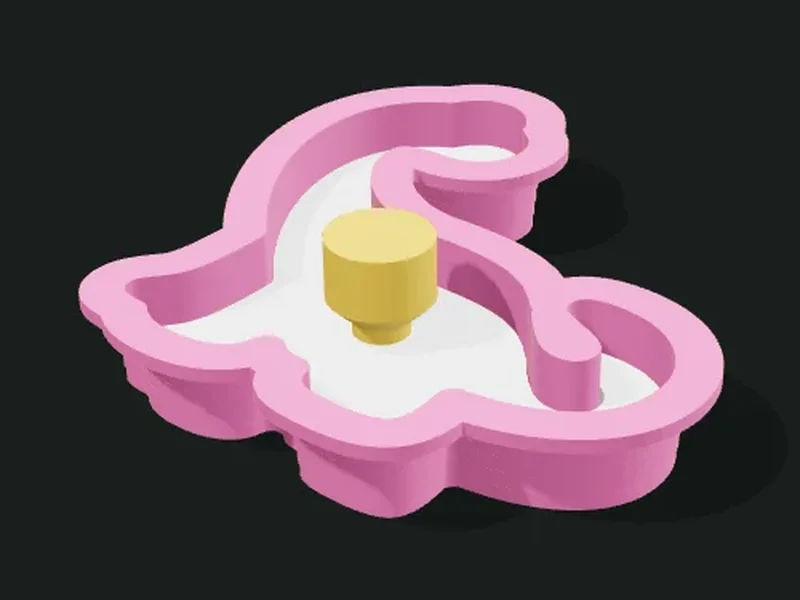
What it’s for
A cookie cutter (or for dough, fondant or clay) with the silhouette of an emoji, a text, your own SVG or a basic shape. The blade tapers toward the edge to cut cleanly, and on top it has a flat rim so you can press without hurting yourself. Optionally it comes with a stamp that goes inside the cutter and marks the drawing on the dough, with a plug-in handle.
Ideas
- Decorated birthday cookies, with the kid’s name or a drawing.
- Themed cutters for Halloween, Christmas or Easter.
- Fondant cutters to decorate cakes.
- Polymer clay or play dough figures.
Step by step
- Choose a preset: dinosaur, heart, star with name, cursive name, mini flowers or ghost.
- In «Shape» choose where the silhouette comes from (emoji, text, SVG or basic shape) and the size.
- Adjust «Simplify outline» until the silhouette has no overly fine details.
- In «Cutter» keep the recommended thicknesses; change the height if the dough is thick.
- If you want to mark the drawing, turn on the stamp and choose what stays raised.
- Export. The cutter, the stamp and the handle come out as separate parts.
Tips
- Print in food-safe PLA or PETG and wash by hand with warm water (hot water deforms it).
- The grooves between layers can trap residue: for frequent use, apply a coat of food-safe resin or use cling film.
- Flouring the cutter and the stamp keeps the dough from sticking.
- Dough doesn’t copy details under 3 mm: raise «Simplify outline» if the cutter has very thin nooks.
Presets
Parameters
Shape
Where the silhouette comes from and what size it is.
Where the cutter’s silhouette comes from: an emoji, a text, your own SVG drawing or a basic shape (heart, star, flower, circle, square, egg).
Emoji that gives the cutter its shape. Search for it by name (in Spanish) in the picker. Emojis with a clear silhouette (animals, fruit) work best.
Text that gives the cutter its shape. With a handwritten font the letters are joined into a single silhouette.
Font of the cutter’s or stamp’s text. Handwritten joins the letters; rounded is more legible on the stamp.
Your SVG drawing. Only filled shapes are used; the outer outline is the cutter’s silhouette.
Basic cutter shape: heart, star, flower, circle, rounded square or egg.
Number of points of the star or petals of the flower.
Size of the cutter measured along its longest side. 60–90 mm is a regular cookie; 40 mm a mini.
Fills in notches and details finer than twice this value, because dough doesn’t copy 1 mm nooks. 2–3 mm gives a clean silhouette that cuts well.
Cutter
The cutting blade: height, edge, base and rim.
Height of the cutter’s blade. 12–15 mm is enough for cookie dough; taller for thick doughs.
Thickness of the blade at the edge (bottom). 0.8 mm (two passes of a 0.4 nozzle) cuts cleanly and doesn’t break.
Thickness of the blade at its base, at the top, where it joins the rim. The blade tapers from this thickness to the edge’s.
Width of the flat rim on top, to press the cutter without hurting your hand. 0 removes it.
Thickness of the rim. 2 mm makes it sturdy.
Stamp
A plate that goes into the cutter and marks the drawing on the dough.
Adds a stamp: a plate that goes inside the cutter and marks the drawing on the dough after cutting.
What stays raised on the stamp: the lines of the drawing (like an outline) or the filled drawing. «Automatic» uses lines for emojis and SVG, and filled letters for text.
Optional text marked on the cookie with the stamp: a name or a date. Leave it empty if you don’t want text.
How far the stamp’s relief sticks out, that is, how deep the mark is in the dough. 1.5–2 mm shows well after baking.
Play between the stamp and the cutter’s blade. 0.5–0.8 mm goes in and out without jamming with dough.
Adds a separate handle that plugs into the stamp, to push it without touching the dough.