What it’s for
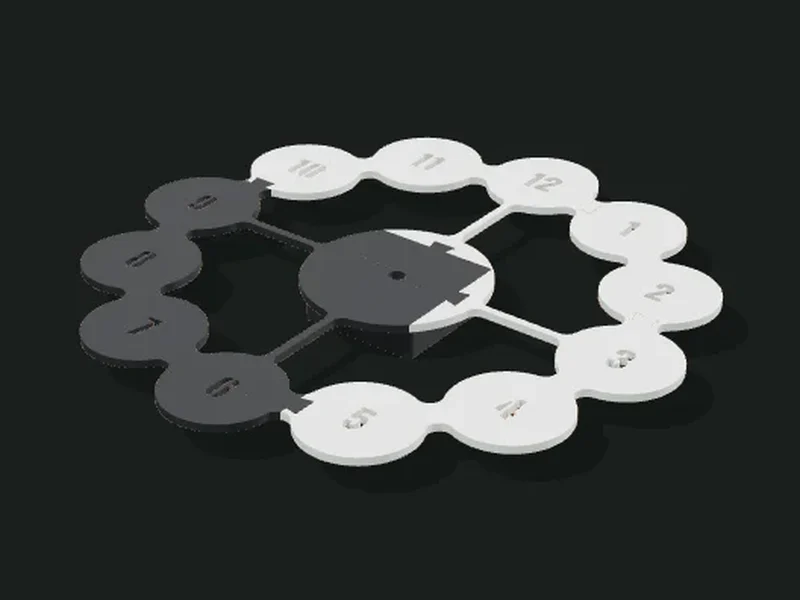
Silhouette wall clocks: flat cut-out plates that print lying down and without supports, for a standard quartz movement (the 56 × 56 mm one with a threaded shaft). Six styles (stone, bubbles, art deco, Voronoi, electronic circuit and abstract geometric), each with its own parameters; the hour marks can be cut through, raised in another color or engraved. If the clock doesn’t fit on the bed, it comes out in 2 or 4 parts that fit together.
Ideas
- Designer clock for the living room or kitchen, in a color that matches the wall.
- Unique clocks to sell: each combination of parameters gives a different model.
- Personalized gift with numbers in another color.
- Big clocks (30 to 45 cm) split into parts for small printers.
- Series of unique clocks with «Variant»: Voronoi, circuit and abstract change the design with a number.
Step by step
- Choose a style and the size of the clock.
- Adjust the shape with the style’s parameters.
- In «Hours» choose the marks: numbers, Roman numerals, bars, dots or none, and how they look.
- In «Movement and assembly» check the shaft hole and the thickness your movement allows.
- Print lying down. Push the movement’s shaft through the hole, tighten the nut and put on the hands.
Tips
- With 4 mm thickness in PLA a 30 cm clock is sturdy; for more than 35 cm use 5 mm.
- Quartz movements are sold with the hands and the hook for hanging: choose hands a bit shorter than the clock’s radius.
- Cut-through marks let the wall show: on a colored wall they contrast very well.
- If the clock comes out in parts, glue the dovetails with a drop of cyanoacrylate.
- The circuit and the abstract are thin-stroke cut-outs: they print whole, so the maximum size is your bed’s.
- Voronoi with the plain face separate in wood-like PLA and the plate in black looks like wood-and-metal clocks.
Presets
Parameters
Clock
Style, size and thickness of the clock, and the minimum stroke width.
Clock style: stone with an open ring, bubbles with numbers, art deco columns, Voronoi with a cut-out zone and plain face, electronic circuit with chip and traces, or abstract geometric with rings and bars.
Size of the clock: the total width of the silhouette. Between 25 and 35 cm is most common for a wall.
Thickness of the plate. 4 mm is sturdy for a 30 cm clock; thicker weighs more and may need the center thinned for the movement.
Parts of the silhouette thinner than this width get thickened automatically, so they don’t break when printing or hanging the clock.
Each number builds another random design with the same parameters (cells, traces or rings). Write down the number you like: it always comes out the same.
Stone with ring
Shape of the central stone and the open ring around it.
Shape of the stone and the ring: 2 is a circle; with higher values it becomes a square with rounded corners.
Rotation of the stone and the ring. With 0° it looks like a rounded square; with 45°, like a soft-sided diamond.
Size of the stone relative to the clock. Smaller leaves more air between the stone and the ring.
Width of the ring around the stone. Wider is sturdier for hanging; narrower looks lighter and more delicate.
How much the ring is cut at the bottom, on both sides of where it joins the stone. With 0 the ring is closed.
Bubbles
Size of the bubbles with the numbers, of the center and of the joins.
Size of each bubble with its number. With 50 % two neighboring bubbles just touch; with less there’s a thin neck between them (as in cut-out clocks), with more they merge.
Width of the thin join connecting the bubbles to each other and to the center.
Size of the center, where the movement goes, relative to the clock.
How many arms join the center to the ring of bubbles: 4 (at 12, 3, 6 and 9), 6 or one per hour.
Rounds the joins between bubbles, arms and center, so they merge like drops. 0 leaves sharp corners.
Art deco
Number of columns, step between them and rounding.
Number of columns of the art deco clock (always odd, so there’s one in the middle).
How much shorter the columns get as they move away from the center. 0 leaves them all equal.
Rounding of the columns’ corners.
Width of the small engraved line separating the columns: they look like separate pieces but the clock is a single part.
Voronoi
Where the cut-out zone with organic cells goes, how much it covers, the cell size and whether the plain face comes out separately.
Where the cut-out zone goes, measured like on the clock: 0° is the top (12 o’clock), 90° the right (3 o’clock), 180° the bottom and 270° the left.
How much of the clock the cut-out zone takes, in degrees. With 180° it’s half the clock; the rest stays plain, with the hour marks.
Average size of each cell in the cut-out zone. Small cells give a fine honeycomb; big ones, a more open cut-out.
Width of the ribs between cells. It shouldn’t be less than the minimum stroke width so nothing gets thickened.
Ring around the cut-out zone. With 0 the cells reach the edge and the outline is wavy, organic.
The plain face can come out in the same part or as a separate 2 mm part to glue on top, in another color or wood-like PLA; the marks are cut through the face and the plate shows.
Circuit
Shape, size of the central chip, trace width and frame of the electronic circuit clock.
Shape of the circuit clock: round or square with rounded corners.
Size of the central chip, where the movement goes. With the movement housing it’s never smaller than the housing, so it stays hidden.
Width of the circuit’s traces. Wider is sturdier; thinner looks more delicate.
Width of the circuit clock’s frame. With 0 there’s no frame and each trace ends in the air with a via.
Abstract
Number of broken rings and bars, the stroke width and the hour marks on the ring.
Number of broken rings around the center of the abstract clock. Each one comes out with a random length and width.
Number of bars coming out of the center. The app adds as many as needed so everything stays connected.
Maximum width of the rings and bars. Each stroke comes out with a random width between the minimum and this value.
Hours
Type of hour marks, which ones are shown, font, size and finish.
Type of hour marks: numbers, Roman numerals, bars, dots or none.
Which hours get a mark: all 12, only the main ones (12, 3, 6 and 9) or the main ones with numbers and the rest with bars or dots.
Hour marks on the bubbles, the circuit and the abstract: numbers, Roman numerals, bars, dots or none. They combine with «Which», the font, the size and the finish, as in the other styles.
Option from earlier versions (Roman numerals on the bubbles): now it’s chosen in «Marks» with «Roman numerals».
Font of the numbers: rounded, condensed (the clearest for clocks) or handwritten.
Size of the marks: the height of the numbers or the length of the bars. On the bubbles they shrink by themselves if they don’t fit.
How the marks look: cut through (they go through the plate and the wall shows), raised in another color, or engraved.
Movement and assembly
Dimensions for the quartz movement and how the clock is split for the bed.
Diameter of the hole the quartz movement’s threaded shaft goes through. Most use 7.5 to 7.7 mm: with 8 mm it fits just right.
Housing for the movement behind the center: the movement stays hidden and the only thing touching the wall is the housing’s base. Without a housing, the movement is visible at the back and the clock stands off the wall by the movement’s depth.
Keyhole slot above the movement to hang the clock from a nail or screw. It reaches the wall just like the movement housing, so the clock hangs straight and rests evenly, without tilting.
Diameter of the head of the nail or screw you’ll hang the clock on. The big hole has 1 mm of extra play and the slot above is for the screw’s shank.
Depth of your quartz movement, front to back (not counting the shaft). The common one is 16 mm: the housing and the hanger have exactly that depth so the clock rests evenly on the wall.
Width of your quartz movement (it’s square). The common one is 56 mm; the recess has 0.3 mm of play per side.
Maximum plate thickness at the center allowed by your movement’s shaft thread. If the plate is thicker, it’s thinned from behind around the movement.
Whether the clock is split into parts to fit the printer: automatic according to the bed size, never, or always in 2 or 4 parts.
Size of your printer’s bed, to decide whether the clock is split and into how many parts.