What it’s for
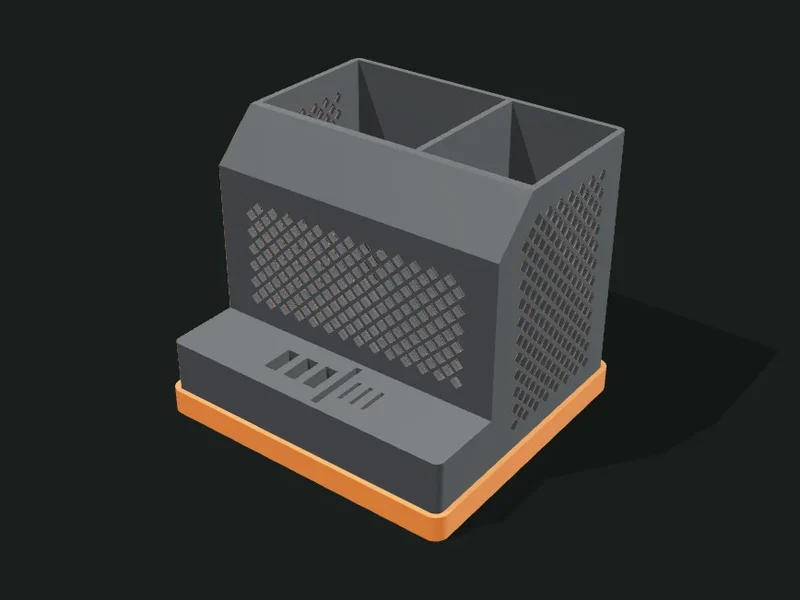
A technical-style container with the top corner chamfered (cut diagonally), perforated side walls and a low shelf at the front with slots sized for USB sticks, SD cards and microSD cards. It can have a separate plinth the body fits into, to print it in another color.
Ideas
- Desk station for USB sticks, memory cards and cables.
- Photographer’s organizer for SD cards and batteries.
- Holder for screwdrivers and electronics tools.
- Makeup or bathroom caddy with an industrial touch.
Step by step
- Choose a preset: «Tech station», «SD card organizer» or «Tall caddy without shelf».
- In «Body» adjust the size, the chamfer and how it’s divided into compartments.
- In «Shelf with slots» set the depth of the shelf and how many slots of each type you want.
- In «Cut-outs» choose the pattern of the side walls.
- Decide whether you want a plinth in another color and export.
Tips
- The slots have standard sizes for USB, SD and microSD; if they don’t fit on the shelf, they’re arranged sideways.
- With many slots, raise the width or depth of the shelf so they aren’t cramped.
- The perforation is on the side walls: a frame of 6 mm or more keeps the corners rigid.
- The plinth fits with a small clearance: 0.3 mm stays firm without glue.
Presets
Parameters
Body
Container dimensions, top chamfer and compartments.
Total width, from left to right (X axis).
Total depth, from front to back, including the front shelf.
Height of the container (the tall part at the back).
Size of the diagonal cut on the container’s top front corner. 0 leaves it square; 15–30 mm gives the characteristic technical look.
Rounding of the vertical corners seen from above. A little (2–5 mm) keeps the technical style.
Thickness of the walls. Since the sides are perforated, 2–2.4 mm is recommended.
Thickness of the compartments’ floor. 1.6–2 mm is enough for normal use.
Number and relative width of the container’s compartments, from left to right. «1.6,1» makes the first one wider.
Shelf with slots
Low step at the front with slots for USB sticks and cards.
Depth of the front shelf, where the slots go. 0 removes it and the container takes up the whole base.
Height of the shelf. It must be greater than the slot depth plus the floor.
Number of slots for USB-A sticks (they stand upright).
Number of slots for full-size SD cards.
Number of slots for microSD cards.
How deep the slots sink into the shelf. 10–12 mm holds USB sticks and cards well without them falling.
Cut-outs
Decorative holes in the side walls.
Shape of the side-wall holes: honeycomb, circles, teardrops (no overhang), diamonds or slots. «Not perforated» leaves the walls plain.
Size of each hole. Small gives a fine grille-like perforation.
Width of the material between holes. Less than 1.2 mm is fragile.
Plain band around the perforation, keeping the edges and corners firm.
Plinth
Separate base the body fits into, to print it in another color.
Separates the base into a plinth the body fits into. That way you can print it in another color (for example, orange with a gray body).
Height of the plinth. 6–10 mm shows as a band of color.
Play between the body and the plinth’s recess. 0.2–0.3 mm stays firm.